Pay your team right, on time.
Staff records, the weekly rota, timesheets and pay runs, with Jamaican payroll deductions worked out and shown line by line.
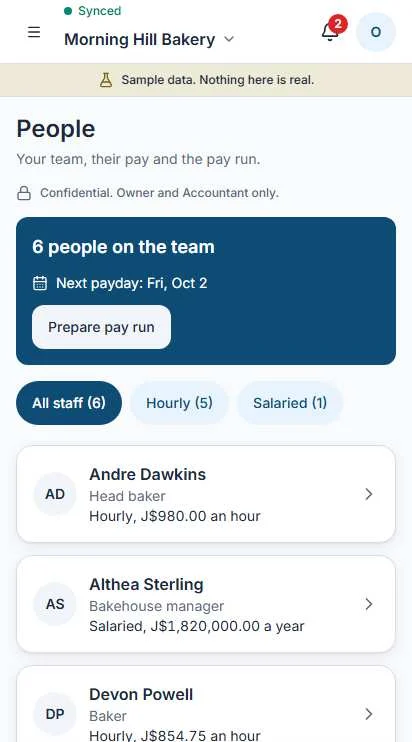
One record for each person.
Name, role, start date and how they are paid. Hourly or salaried, set once and changed with a date.
Sensitive details stay protected
Example, masked. Numbers are hidden on screen. Only the owner and the accountant can open staff records.

Plan the week. Approve the hours.
Rota week grid
Who works which day, in one grid. Move a shift and the person sees it.
Timesheets you approve
Hours come in from the rota or from staff. You approve them before they reach a pay run.
Leave requests
Staff ask, you say yes or no. Approved leave shows on the rota.
Public holidays
They sit on the calendar, so nobody gets rostered by mistake.
A pay run in four moves.
- 1
Period
Pick the week, fortnight or month you are paying for.
- 2
Hours
Approved hours load in for each hourly person. Salaried staff are already set.
- 3
Review
Every deduction shown line by line, per person, before anything is final.
- 4
Confirm
Confirm and the run is locked. Payslips are ready to share.
Flags for unusual hours
At the review step, Operate marks hours that look off, so you check before you pay.
- Hours far above that person's usual.
- A shift with no end time.
- Hours on a day of approved leave.
A flag asks a question. You decide the answer.
Jamaican payroll, worked line by line.
Here is one fortnight for one person. Every figure is shown, so you can check it with a calculator.
Payslip: A. Campbell, shop assistant
Fortnightly, salaried. Example, fictional figures.
Employer costs
What you pay on top, for the same fortnight.
Example, fictional figures. Rates live in a dated statutory pack and update when the law changes.
PAYE is 25% of statutory income above the annual threshold. This person is under it, so PAYE is J$0.00.
Ready to file. Posted to your books.
Deadlines Operate prepares for
Operate prepares the figures. You file and pay yourself, then tap Mark as filed.
Payslips as PDF or WhatsApp
Operate prepares the payslip and the message. You send it with Open in WhatsApp.
Posts to the books
Wages, deductions and employer costs go into your books when you confirm the run.
Mistakes are reversed
A confirmed run is never edited. A correction is a reversal with a reason.
Pay stays private.
Can open payroll
- Owner
- Accountant
Never sees payroll
- Cashier
- Staff
A cashier never sees profit, cost prices, payroll or settings.