Everything in Operate, in one place.
Every module and what it does. Search for a feature, or filter by where your business is today.
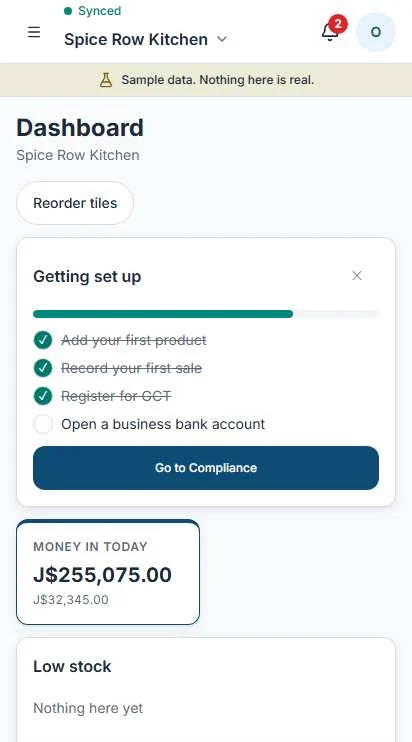
The dashboard, with sample data.
Module directory
Showing every feature. Pick a tier to see what you have at that stage and below. Nothing is behind a paywall.
- Cash todayWhat is in the drawer and what came in by other tenders.Informal
- Sales this weekCompared with last week, by day.Informal
- Tiles laid out by industryA restaurant, a guesthouse and a salon each start with their own tiles.Informal
- Move and hide tilesEdit your home screen and put the tiles you use first.Informal
- Deadlines and alertsWhat is due, what is late, what needs a look.TRN
- End-of-day summarySales, voids, tenders and what the drawer should hold.Informal
- GCT positionWhat you have collected and paid on this period, before you prepare the return.GCT registered
Sell
The register. It keeps selling with no connection and syncs when it is back.
- Works with no connectionA banner tells you, the sale carries on, and it syncs later.Informal
- Cash, card, transfer, checkRecord how they paid. Card is taken on your own card machine.Informal
- Split paymentPart cash, part card, part on account, on one sale.Informal
- On accountThe sale goes on the customer's trust book, never into the drawer count.Informal
- Barcode scanningScan with the camera or a scanner and the item is in the basket.Informal
- Shifts and blind countCount the drawer first, then see what is short or over.Informal
- Z-reportA closing report for the shift, with voids and cash movements shown.Informal
- Voids and refundsEach needs a reason and leaves a visible record.Informal
- Products and pricesCategories, units, barcodes and photos.Informal
- Stock countsCount a shelf, post the difference, keep the record.Informal
- Suppliers and purchase ordersOrder, receive, and the bill is raised for you.TRN
- Cost pricesKept from your cashier; only people you allow see them.TRN
- Batches and spoilageMade on a day, sold over days, written off when it turns.Growing
- Recipes and productionTurn ingredients into products and see what each batch cost.Growing
- Kitchen boardOrders reach a screen in the kitchen and get marked as ready.Growing
- Quotes, jobs and job costingQuote a job, track the hours and materials, see what it made.Growing
Invoicing
Quotes and invoices you can send, and a clear list of who owes you.
- Invoices and quotesNumbered in order, with your business details on top.Informal
- Send by WhatsApp or emailOperate prepares the message; you send it.Informal
- Record paymentsPart payments and overpayments handled, tender noted.Informal
- Who owes you, by ageCurrent, late and very late, with the customer behind each line.TRN
- Customer statementsEverything a customer owes in one page.TRN
- Reminder draftsA polite note ready to open in WhatsApp.TRN
- GCT on invoicesShown only once you say you are GCT registered.GCT registered
- Retire, never deleteAn invoice taken out of use keeps its number and a reason.Informal
- Money in and outSales and expenses land here without retyping.TRN
- Profit and lossBy month, for your own eyes or your accountant's.TRN
- GCT return figuresPrepared for you to check, then you submit to TAJ and tap "Mark as filed".GCT registered
- Filed lockOnce a period is marked as filed, its figures stay put.GCT registered
- Accountant viewA role that sees the books, not the register.TRN
- Opening balancesStart from where you are today.TRN
- Assets and depreciationEquipment on the books, written down over time, sold or retired.Growing
- Quick entryAmount, who, what for, in a few taps.TRN
- Receipt photosSnap the receipt and keep it with the entry.TRN
- CategoriesThe ones a small business actually uses.TRN
- Bills to pay laterRecord a bill now, mark it paid when it is.TRN
- GCT on what you buyTracked on expenses so the return figures add up.GCT registered
- Who spent itStaff expenses carry a name and need your approval.TRN
People and payroll
Rotas, pay runs and the statutory deductions, worked out for you to check.
- Staff listRoles, contact details and pay rates.Informal
- RotaPlan shifts for the week and see who is on.Growing
- Pay runsHours and pay rates in, payslips out.Growing
- Deductions worked outEmployee NIS 3%, NHT 2%, Education Tax 2.25% and PAYE 25% above the annual threshold.Growing
- Employer costsHEART 3%, NIS 3%, NHT 3% and Education Tax 3.5% shown with each run.Growing
- PayslipsOne for each person, each pay run.Growing
- SO1 and SO2 figuresPrepared for the 14th of each month and 31 March.Growing
- Pay historyEvery run kept, with changes marked.Growing
- Deadline calendarBuilt from what applies to you, not a generic list.TRN
- Tax compliance certificateKnow when it lapses before you need it.TRN
- Documents and expiryLicenses, permits and certificates, with dates.TRN
- GCT return due dateThe last working day of the following month.GCT registered
- Mark as filedYou file with TAJ yourself, then record it here.Growing
- Formalising stepsA short list for moving from informal to registered.Informal
- Retire with a reasonDocuments are never deleted.Informal
- Customer listName, number, notes and what they usually buy.Informal
- Purchase historyEvery sale and invoice behind a name.Informal
- Trust bookWho owes you on account, and the sales behind it.Informal
- WhatsApp messagesPrepared for you, sent by you with "Open in WhatsApp".Informal
- Birthdays and tagsGroup regulars, wholesale buyers or anyone you choose.TRN
- DealsFollow a larger sale from first enquiry to won or lost.Growing
- Messages inboxReplies and drafts in one place.Informal
Online
A simple storefront, orders and bookings for seven kinds of business.
- StorefrontA page for your products with a WhatsApp order button.Informal
- OrdersPay later or on collection; a collected order becomes a sale.Informal
- Bookings: tables, appointmentsSlots and tables with times that cannot double up.Informal
- Bookings: rooms and staysCheck in, check out, extras and hire.Informal
- Bookings: rentals and spacesEquipment, rooms and halls by the hour or day.Informal
- Bookings: site visits, eventsVisits for quotes, and events with a head count.Growing
- AvailabilitySet your hours, days off and how many you can take.Informal
- InsightsBusiest hours, best sellers and payment mix, in plain words.TRN
- Readiness bandA band, not a score: where your records stand and what would move them.TRN
- Sharing switchesShare a readiness summary or share with an advisor. Both off until you turn them on.TRN
- Grants and programsOnes you may be ready for, each with a "Last checked" date.Growing
- Export readinessGates for each market, checked against what you hold.Growing
- AssistantExplains, summarizes and drafts. Labeled as such; you confirm anything it suggests.Growing
- RolesOwner, Manager, Cashier, Accountant, Staff and Advisor.Informal
- Cashier viewCashiers never see profit, cost prices, payroll or settings.Informal
- Business profileYour industry, tier and what shows on documents.Informal
- Tier promptsNear the GCT threshold Operate says so; nothing changes until you confirm.Informal
- Your recordsExport them when you want to.Informal
- Reasons on recordVoids, refunds and retired documents keep who and why.Informal
Nothing matches that. Email us and ask: info@operateja.com
Coming next.
On the way. We'll announce each one when it's ready.
- HR
- Loyalty and vouchers
- Customer feedback
- Planning
- Checklists
- Memberships
- Delivery
- Multi-location
- Accountant access
- Supplier ordering
- Bank statement import
- Importing history from other bookkeeping software and spreadsheets
When importing arrives, records brought in from other software will count toward your readiness and carry their source label.
Start with the register. Add the rest when you need it.
Operate is free for small businesses, and early access is opening in Jamaica.