Never miss a filing again.
Operate builds your deadline calendar from the facts you record, reminds you early and keeps your papers in one place.
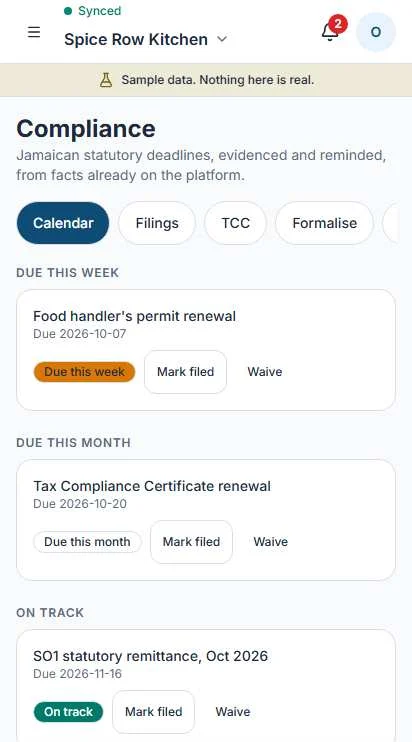
A calendar that builds itself.
Tell Operate you are GCT registered, run a payroll or sell food, and the matching deadlines appear. Nothing to type in twice. Everything sits in one of four groups.
Past its due date and not marked as filed.
Stays at the top until you file it or waive it.
The week ahead, so nothing arrives as a surprise.
Operate reminds you as the date gets close.
Due before the month ends.
Time to start preparing the figures.
Further out, in date order.
Annual items like SO2 and renewals sit here until they are close.
Deadlines covered: the GCT return, SO1, SO2, the Companies Office annual return, TCC renewal, food handler permits and sector licenses.
What's on your calendar?
Answer three questions and see the recurring deadlines that would apply.
Recurring obligations
Your calendar in Operate is built from your own records. Due rules live in a dated statutory pack and update when the law changes.
You file. Operate keeps the record.
Operate prepares the figures. You check them and submit to Tax Administration Jamaica yourself, then record that it is done.
Mark as filed
Add the date, your reference and a proof file if you have one. The record stays with the deadline.
Open TAJ
A button takes you to TAJ with the figures ready to copy. You submit and pay there.
Waive with a reason
Not applicable to you? Waive the deadline and say why. It leaves a visible note, not a gap.
Reminders
You are reminded as each date gets close, so the figures are ready before the day.
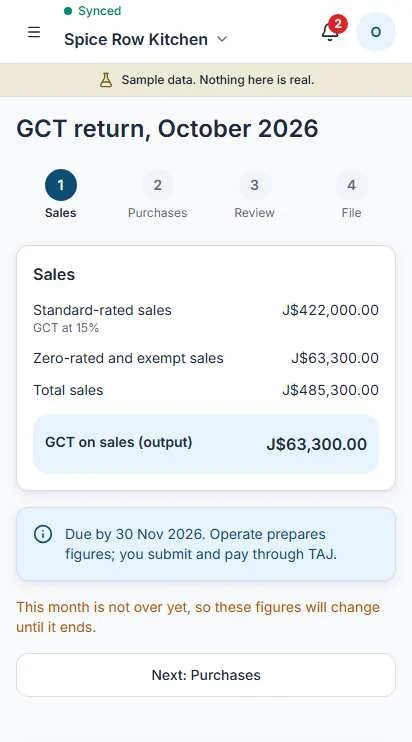
A GCT return, prepared from your sales.
Every paper in one vault.
Keep what you will be asked for in one place, with the expiry date beside it.
| Document | What Operate keeps | Expiry warning |
|---|---|---|
| TRN certificate | The file and your TRN | Only if it carries an expiry date |
| Business registration | The certificate and registration details | Only if it carries an expiry date |
| TCC | The certificate and its expiry | Yes, with the renewal on your calendar |
| Permits | Food handler permits and sector licenses | Yes, before each one lapses |
| Fire certificate | The certificate and its expiry | Yes, before it lapses |
Replace
Got a renewed permit? Add it. The old one stays on file beside it.
Retire with a reason
Documents are never deleted. You retire one and say why, so the history stays honest.
From informal to ready.
Five steps, and you can start on any of them. Operate shows where you are and what the next one needs.
- 1
Trading informally
Nothing to set up. Sell, keep simple stock, run the trust book.
- 2
Got a TRN
Add your TRN. Expenses, basic books and compliance deadlines open up.
- 3
Business registered
Record your registration and keep the certificate in the vault.
- 4
Tax compliant with a TCC
Keep a current TCC on file. Its renewal goes on your calendar.
- 5
Ready for programs and funders
Filings marked, papers current, records kept. You may be ready for programs that ask for them.
Cook shop, bakery or restaurant?
Food businesses get a food handling summary in the same place as every other deadline.
- Food handler permits for each person, with expiry and renewal on the calendar.
- An allergens summary built from what you record on your products.
- Sector licenses and certificates in the vault, with their own expiry dates.